TF CARD (SD CARD) Operation - SPI Mode
Warning
For this chapter, I don't recommend you to refer to the code from the Alientek. After testing, I found that the program doesn't seem to work. So I referred to the content on the Internet and rewrote the content of this chapter.
Introduction
SD Card Overview
Many microcontroller systems require high-capacity storage devices to store data. Common options include USB drives, FLASH chips, and SD cards. Each has its advantages, but overall, SD cards are the most suitable for microcontroller systems. They offer large capacities (over 32GB), support SPI/SDIO interfaces, and come in various sizes (standard SD card and Micro SD card sizes), meeting the requirements of different applications.
With just a few IO pins, you can extend storage capacity to 32GB or more, with a wide range of choices from tens of megabytes to tens of gigabytes. They are easy to replace, simple to program, and are the preferred choice for large-capacity external storage in microcontroller systems.
The ZD Atom ESP32-S3 minimal system board uses a Micro SD card interface with a self-locking card slot. The SD SPI host driver is implemented based on the SPI Master Driver. With the SPI host driver, the SD card and other SPI devices can share the same SPI bus. The SPI host driver handles exclusive access from different tasks.
Info
A complete SD card operation process involves the host (e.g., a microcontroller) initiating a "command." The SD card determines whether to send a response or data based on the command's content. For read/write operations, the host must also send a command to stop reading/writing data to end the operation. This means that after the host sends a command, the SD card may not respond or provide data, depending on the command's meaning.
Card Modes
SD cards have two effective operation modes: "Card Identification Mode" and "Data Transfer Mode." Based on the operation method, there are SD mode and SPI mode. The ZD Atom ESP32-S3 minimal system board uses SPI mode.
Key Steps
- SD card initialization (SPI mode/SDIO mode)
- SD card read/write operations
Warning
The ESP32's SDIO driver mode and SPI driver mode are not compatible. You can only choose one driver mode.
Use Case
This experiment functionality overview: After a series of initializations, a while loop is used to check if the SD card initialization is successful. If the SD card is initialized successfully, relevant parameters of the SD card will be output through the serial port or VSCode terminal. At this time, the LED will blink, indicating that the program is running.
Resources Used
- LED
- LED: IO0
- SD Card
- CS: IO14
- SCK: IO12
- MOSI: IO13
- MISO: IO11
Connection Diagram
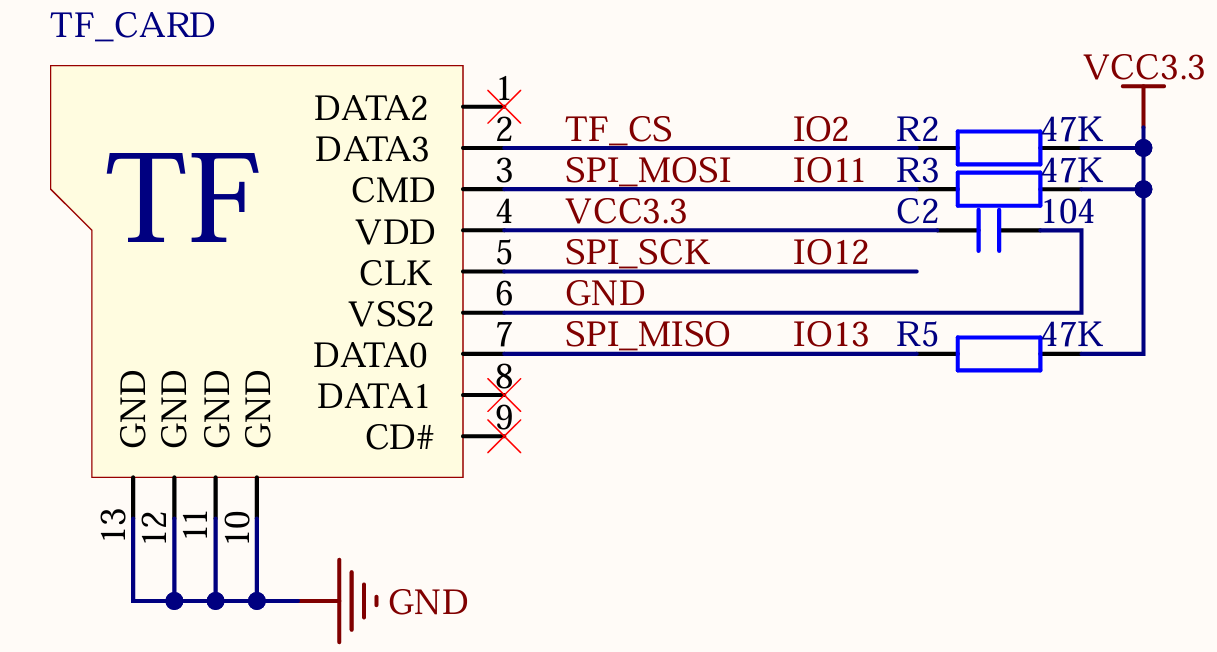
This experiment connects the SD card to the ESP32-S3 using the SPI interface. The system board has an onboard Micro SD card slot for connecting the SD card. The schematic for connecting the SD card to the ESP32-S3 is shown below.
Dependencies
This section depends on components such as sdmmc, vfs, fatfs, driver, and node_spi.